Feature
Bulk URL category check by index status
Paste a list of URLs and sort them into index-status categories in one pass: indexed, not indexed, and crawled but not indexed. Then keep them monitored so you see the day a URL changes category, not weeks later.
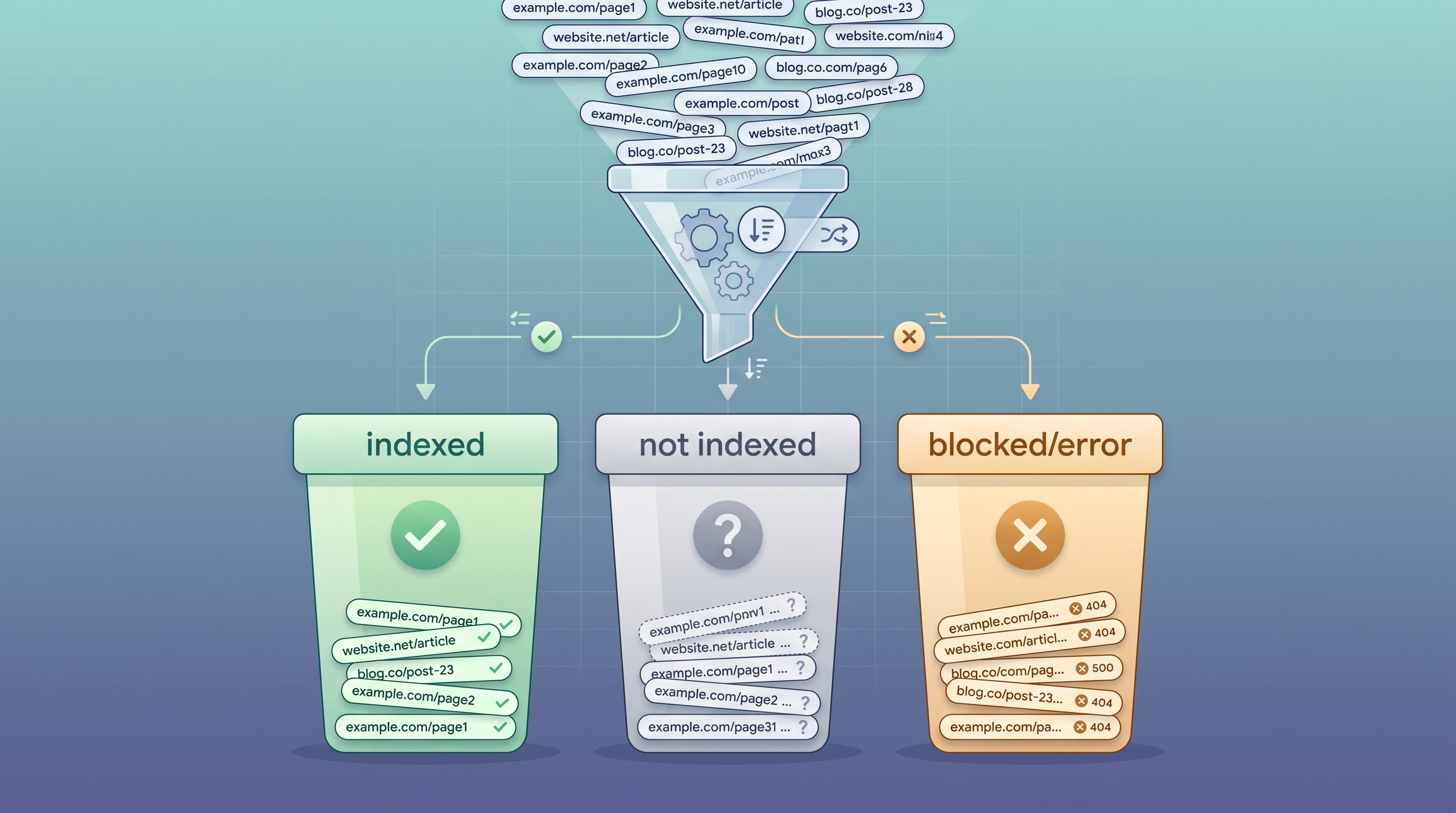
“URL category” means two different things
Before you pick a tool, be clear on which category you actually need. The phrase “bulk URL category check” is used for two unrelated jobs, and most tools only do one of them.
Content / security category
What content class a firewall or proxy assigns a URL: social networking, malware, gambling, business. This is web filtering. If that is your job, use a URL categorization database such as Palo Alto Networks URL Filtering, Zscaler Site Review, Netskope, or zvelo. Confirm categories on each vendor’s own site.
SearchOptimo does not do this.
Search index-status category
Which search-index bucket each URL falls into: indexed, not indexed, or crawled but not indexed. This is an SEO and site-health job. It tells you which of your pages Google can actually surface. This is exactly what SearchOptimo categorizes, in bulk and on a schedule.
This is what this page is about.
The four index-status categories your URLs get sorted into
Every URL in your list lands in exactly one bucket. That single sort turns a flat list of hundreds of URLs into a prioritized worklist: fix the not-indexed pages, investigate the crawled-not-indexed ones, confirm the rest are still live.
Indexed
The URL currently appears in Google search. Live and discoverable.
Not indexed
Google has no record of the URL in search. Nobody can find it organically.
Crawled, not indexed
Google fetched the page but left it out. The most common non-indexed category.
Blocked or error
A noindex tag, robots block, or fetch failure is preventing indexing.
New to the middle bucket? Read why pages get “crawled - currently not indexed” for a fix checklist.
How to run a bulk URL category check
1. Paste your URL list
Drop in your URLs, one per line. Import a whole campaign or paste an ad-hoc batch.
2. We check each URL live
Each URL is checked against Google’s current index and sorted into its status category. No 3 to 4 day Search Console lag.
3. Keep them monitored
Re-run on a schedule and get alerted the day any URL changes category.
Why a one-off category check is not enough
A category is a snapshot, and index status is not static. A page indexed today can quietly fall into the not-indexed bucket next month, and a one-time checker or browser extension never tells you: once you close the tab, nothing is watching and there is no record to compare against.
SearchOptimo is a monitoring tool, not an indexer. It does not push pages into Google. It watches whether your URLs are and stay indexed, keeps a per-URL index-status history timeline, and alerts you the day a URL drops out. That turns a bulk category check from a throwaway snapshot into an early-warning system.
Free forever
The Basic tier is free with no credit card: 100 URLs per month, 3 campaigns, daily monitoring, and 7-day history. Paid plans scale to 20,000 URLs per month with a 30-day money-back guarantee and cancel anytime.
Related tools and guides
- Free bulk index checker
Paste URLs and categorize by index status, no signup.
- Bulk index checker tool
The live tool page with a runnable checker.
- Google index checker
Check whether a single URL is indexed by Google.
- Check if multiple URLs are indexed
The step-by-step guide behind this feature.
Frequently asked questions
- What does "bulk URL category check" mean?
- The phrase is used two different ways. In network security it means content categorization: asking a firewall or proxy database (Palo Alto PANDB, Zscaler, Netskope, zvelo) what content category a URL belongs to, such as social networking, malware, or gambling. In SEO it means categorizing a list of URLs by their Google index status: indexed, not indexed, or crawled but not indexed. SearchOptimo does the second one.
- Does SearchOptimo classify URLs into content or security categories?
- No. SearchOptimo does not return web-filtering or threat categories. If you need to know whether a URL is classified as phishing, adult, or business content, use a URL filtering database like Palo Alto Networks URL Filtering, Zscaler Site Review, or zvelo. SearchOptimo categorizes URLs by one thing: whether Google has them in its search index.
- What index-status categories does the bulk check sort URLs into?
- Four buckets. Indexed means the URL currently appears in Google. Not indexed means Google has no record of it in search. Crawled - currently not indexed means Google fetched the page but chose to leave it out. Blocked or error means a noindex tag, robots block, or fetch failure is stopping indexing. Each URL in your list lands in one bucket.
- How many URLs can I categorize at once?
- The free bulk index checker tool categorizes the first 5 URLs of each run, capped at 20 URLs per day, with no signup. A free SearchOptimo account covers 100 URLs per month with daily monitoring, and paid plans scale to 20,000 URLs per month.
- Why does a URL show as "crawled - currently not indexed"?
- Google fetched the page but decided not to index it. Common causes are thin or duplicate content, weak internal linking, crawl-budget triage on large sites, or a soft quality signal. It is the single most common non-indexed category, which is why sorting your URLs by it is useful before you fix anything.
- Does the category update automatically over time?
- Yes, on a paid campaign. A one-off check gives you today’s categories. SearchOptimo re-runs the check on your schedule and keeps a per-URL index-status history, so when a URL moves from indexed to not indexed you get an alert the day it happens instead of finding out weeks later.
Categorize your URLs, then keep them watched
Sort your list by index status today and get an alert the day any page changes category.
Start free, no credit card